Building Scalable Directory Frameworks and File Taxonomies
Overview
Design Operations & Process Improvement project.
Aimed to streamline processes, decrease asset hunting time, and address friction points in the design workflow.
Chose to automate repetitive tasks such as file sorting and categorization.
Implemented a robust tagging system to improve searchability of assets.
Identified key areas of delay such as permissions for accessing shared resources.
Improved cross-departmental collaboration by creating a unified file management system.
Enhanced employee satisfaction by reducing time spent on non-creative tasks through automated processes.
Increased project turnaround time due to easier access to necessary design assets.
Background
Chegg's team doubled during rebranding, which doubled content production volume and necessitated better resource management.
Operational challenges included bottlenecks during file requests from stakeholders and unclear file naming/directory structures for marketers.
Smaller team previously allowed for more personalized communication, quicker file retrieval, and manageable asset organization without specialized systems.
Engaged with stakeholders via 1:1 inquiries and feedback sessions with designers to pinpoint specific needs and identify common pain points.

Purpose
Creative Marketing team faced significant productivity loss, with employees reporting losing up to 8 hours (one day) each week on file management.
Inefficiencies were compounded by frequent duplicate file versions and dead links.
Productivity challenges impacted potential cost efficiency, with projects estimated to be over-budget by 15% due to time lost locating resources.
Unaddressed issues could lead to missed deadlines, decreased client trust, increased operational costs, and delayed product launches.
Focus
Employed 1:1 informational inquiries, domain research, competitive analysis (reviewed three competitors’ systems), and feature prioritization.
Used cognitive walkthroughs for test iterations and real-time feedback to fine-tune the flow of the new file management system.
Focused on essential features like automated backups and version control.

Role
Led initiatives to explore Digital Asset Management (DAM) systems, evaluating three solutions over a two-month period.
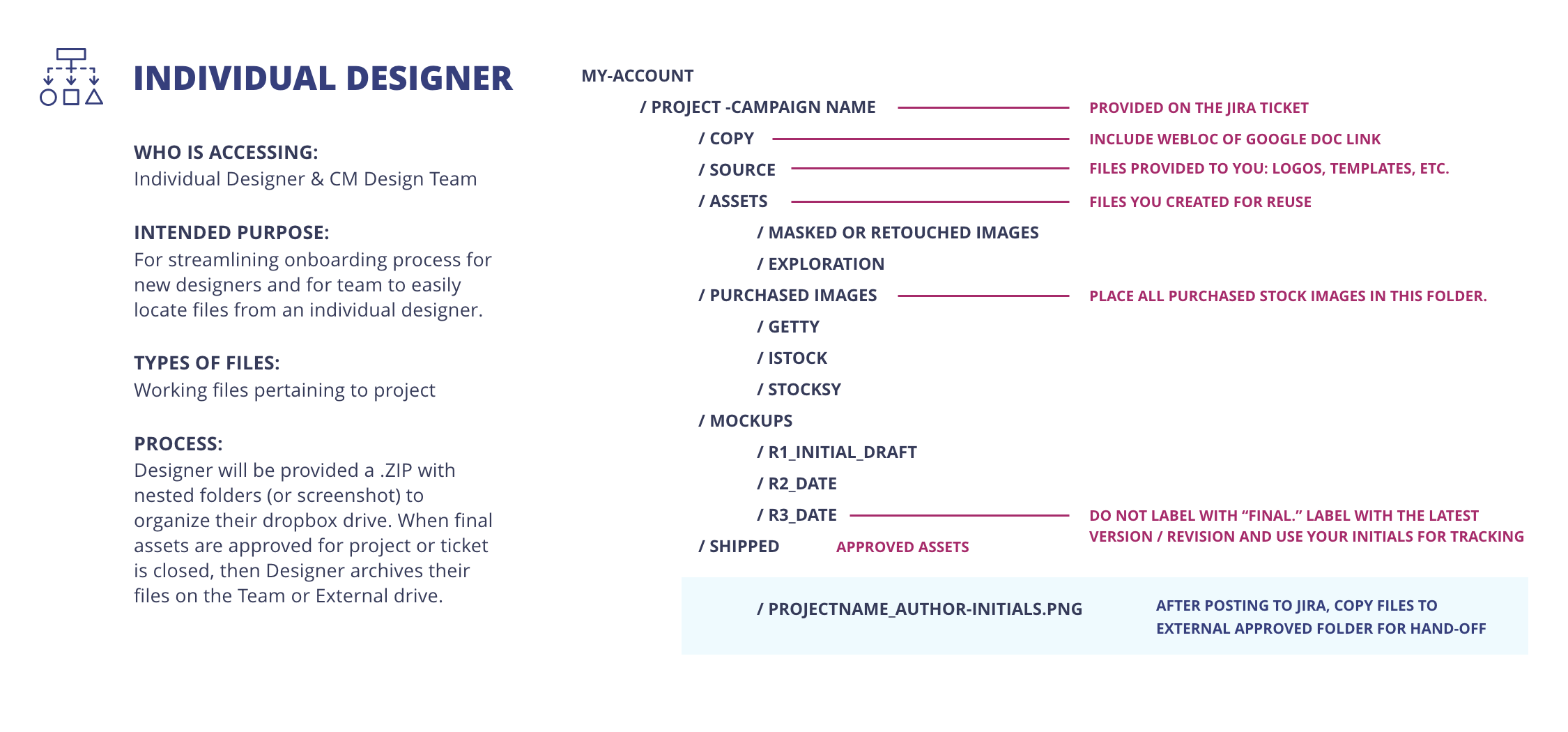
Proposed and implemented new file frameworks and a taxonomy tailored to marketing content needs to reduce redundancies.
Established secure and scalable directory frameworks in collaboration with IT.
Communicated updates through weekly sync meetings and monthly newsletters.
Navigated team dynamics by encouraging open dialogue, implementing conflict resolution strategies, and developing clear roles and responsibilities.

Scope
Budget constraints required leveraging and optimizing existing resources like Dropbox and G Suite.
Leveraged Dropbox's API to integrate with existing project management tools.
Solution design involved cross-departmental feedback from marketing, design, and IT.
Pivoted strategy based on team feedback to prioritize integration with existing tools and rapid implementation of critical changes.
Redesigned taxonomy based on early user feedback from cognitive walkthroughs indicating a need for simplicity.

Process
Research & Discovery: Conducted 3 stakeholder interviews, drew insights from information architecture mapping, and performed competitive analysis.
Strategy Development: Prioritized a two-phase rollout to accommodate immediate and future needs while staying within budget constraints.
Implementation & Training: Deployed the folder system, automated directory creation, and delivered team presentation.
Overcame challenges by developing custom scripts for automation to bridge tool functionality gaps and refining folder hierarchy to mitigate scalability issues.

Conclusion
Initiatives laid a foundation for more systematic file management, expected to reduce bottlenecks and improve long-term operational efficiency.
Realized the importance of ongoing team training, iterative process refinement, and contingency planning for future system changes.
Demonstrated capacity to lead and implement effective design operations strategies under resource constraints.